QUICK LINKS
My LTC
Conference Centers
Forsyth Conference Center
Ramsey Conference Center
Foundation
Help Center
Quick Links
My LTC – Students
My LTC – Faculty & Staff
Laker Login Portal
LTC eAlert
Accessibility/Accommodations
LTC Experience (formerly Bannerweb)
Blackboard
Catalog and Student Handbook
Email – Students
Email – Faculty & Staff
Campus Police & Public Safety
Behavioral Intervention Team (BIT) Concern Form
Skip to content
REQUEST INFO
PROGRAMS
ADMISSIONS/STUDENT AFFAIRS
Admissions
How to Apply
Application Deadlines
Application Status
Admissions – Dual Enrollment
Admissions – International Students
Admissions – Transfer Students
Admissions – Transient Students
Admissions Classifications
Admissions Testing
College Tours
Readmission
Residency Policy
Admissions/Student Affairs Forms
FUTURE STUDENTS
ECONOMIC DEVELOPMENT
Economic Development
Advanced Manufacturing Technology Center
Ammonia Refrigeration Training
Continuing Education
ADULT EDUCATION
ABOUT
APPLY NOW
Lanier Technical College
➤
Online Learning
➤
Blackboard Student App
How to Get Started
Blackboard Student App
Online Course Schedule
Earn a Certificate, Diploma, or Degree Online
Is Online Learning for Me?
Start Your Online Class
Proctored Event
Blackboard Help
Blackboard Helpdesk
Blackboard Online Help
Browser Check
Supported Browsers
Phone: 770-533-7048
The Blackboard app is designed specifically for students to view content and participate in courses on their mobile device.

Feature Guide for the Blackboard App
Install App
Use these steps to download and install the Blackboard app.
From your device, access the appropriate online store.

If necessary, search for Blackboard.
Install the Blackboard app on your mobile device.
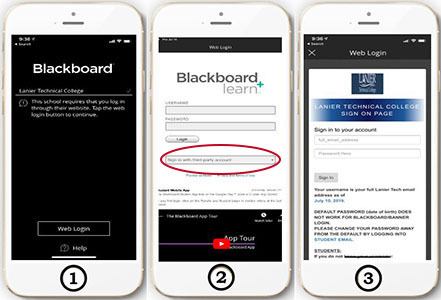
Login to App
Open the Blackboard app and search for the full name of your school. Select Web Login
Select Sign in with Third-Party Account – Student and Faculty Login
This brings up the LTC Sign On Page. Login with your Blackboard username and password